
For groep 7 and 8 at a Dutch primary school
A tutor made to fit your child. At home.
Helping with homework is hard when it is in Dutch. Klimbo is for children in groep 7 and 8 at a Dutch primary school: your child practises maths, spelling and reading in Dutch, with a tutor that adapts to how they really learn. You follow along in English, and you see how it is going before the school report comes.
The tutor, in Dutch
Kijk nog eens naar het woord ‘dat’. Naar welk woord wijst het terug?

- Groep 7 and 8
- Fifteen minutes a day
- Free until the official start
Tutoring is one hour a week. With Klimbo your child practises for fifteen minutes every day.
Join
Join for free until the official start
You create an account today and your child starts with a starting check of about half an hour. Until the official start in January 2027 you pay nothing. Now and then we ask you what could be better.
- 1
Create an account and add your child.
- 2
Your child does the starting check, then practises fifteen minutes a day.
- 3
Now and then you tell us what could be better.

Not ready yet? Leave your email address and we will keep you posted.
Why Klimbo
Where Klimbo fits between tutoring and helping yourself
Many parents practise with their child in the evening, or wait until tutoring is needed. With Klimbo your child practises a little every day, and the tutor explains what goes wrong.
Tutoring
Cheaper than tutoring, and your child practises every day instead of one hour a week.
Read moreLess
A practice app
A practice app gives questions. With Klimbo a tutor also explains what went wrong.
Read moreLess
A chatbot
First a hint and a second try, only then the answer.
Read moreLess
Your child
What your child does on the tablet
A session takes fifteen minutes, in Dutch, just like school. The screens are from the first version of the app.

- 1
First a starting check
Your child answers questions for about half an hour, in a few short parts. After that the tutor knows where practice starts.
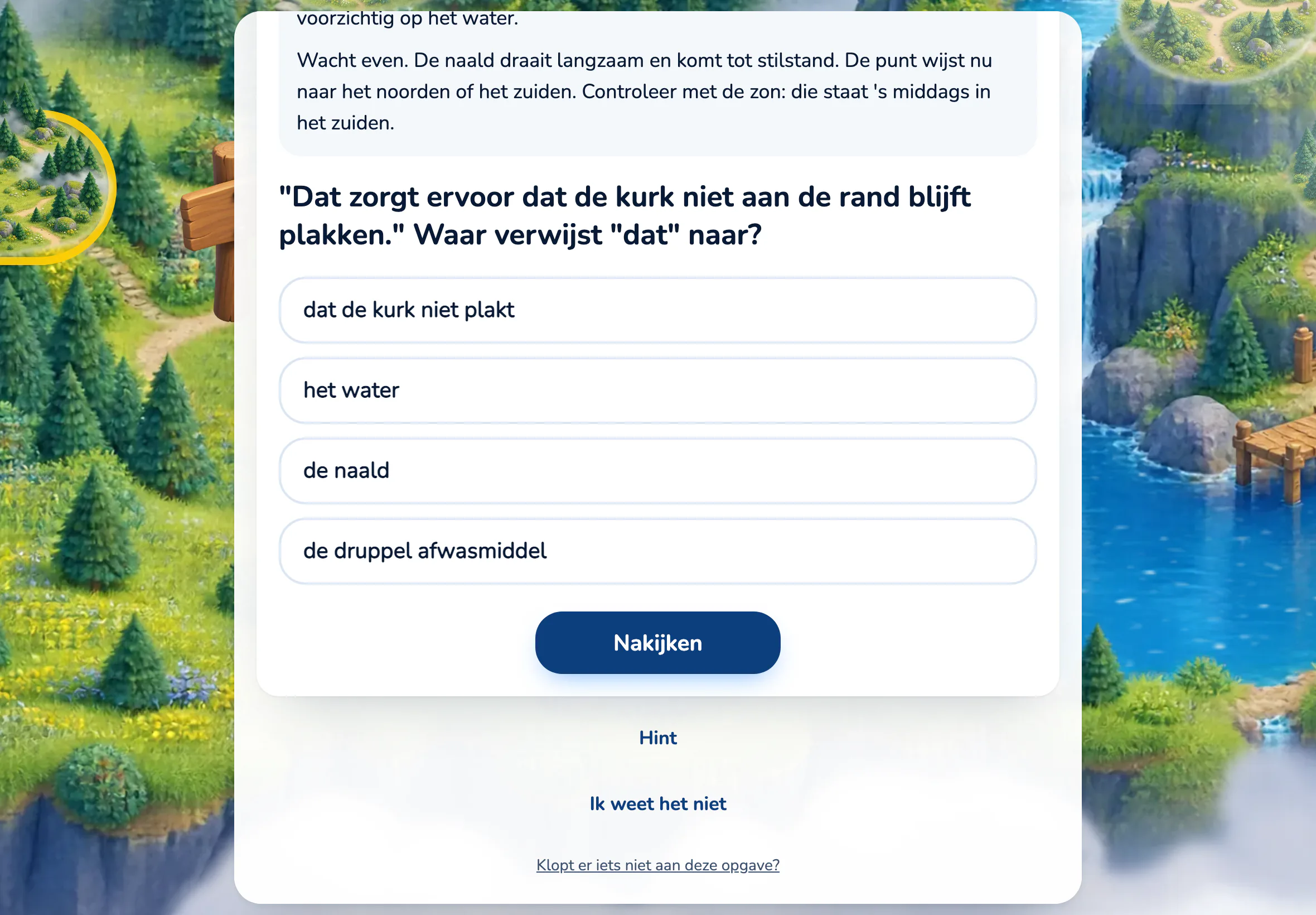
Reading comprehension: the text at the top, the question below it, then the buttons for a hint and for I don't know.
- 2
Then a short session every day
Something to repeat that is nearly solid, something new to practise, and ending with something that works out. Typing, choosing, dragging, putting in order.
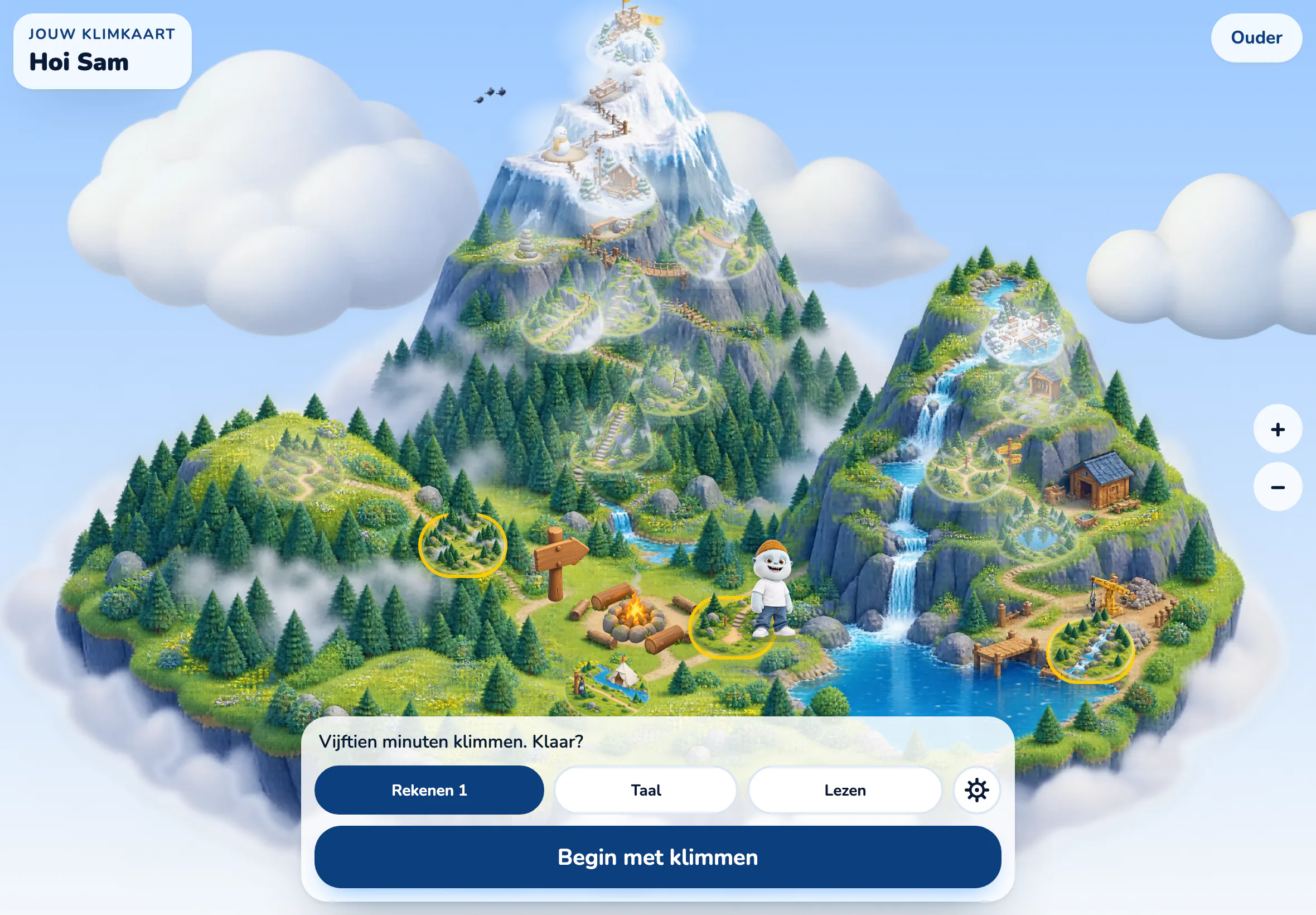
The start screen: progress as a map, no mark, no ranking.
- 3
After a mistake the tutor helps
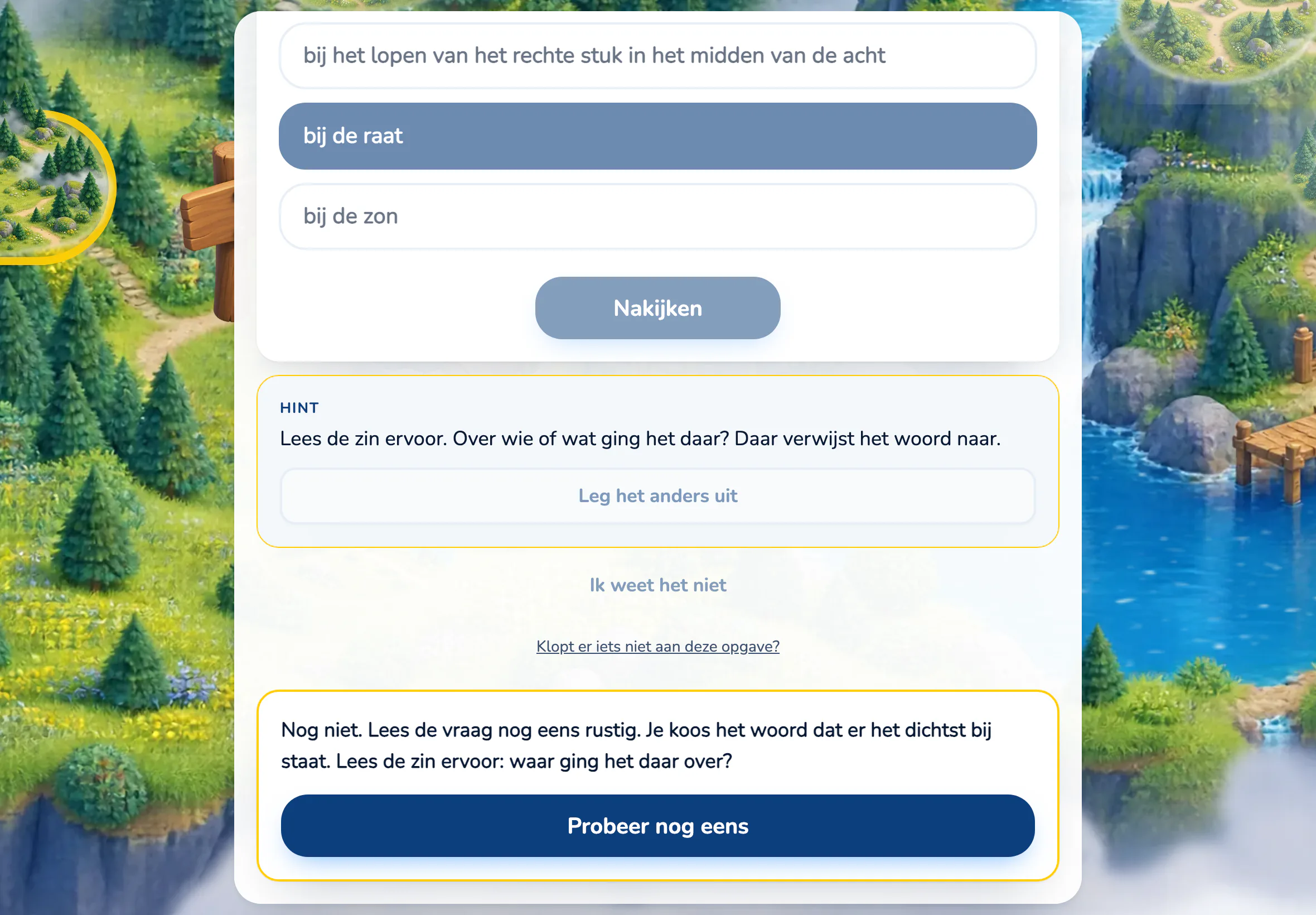
First a hint, then an explanation that fits the thinking mistake, and a second try. Only if that goes wrong too does the tutor show how it is done.
How the tutor responds when an answer is not right: first a hint, then an explanation.
You
What you see on your phone
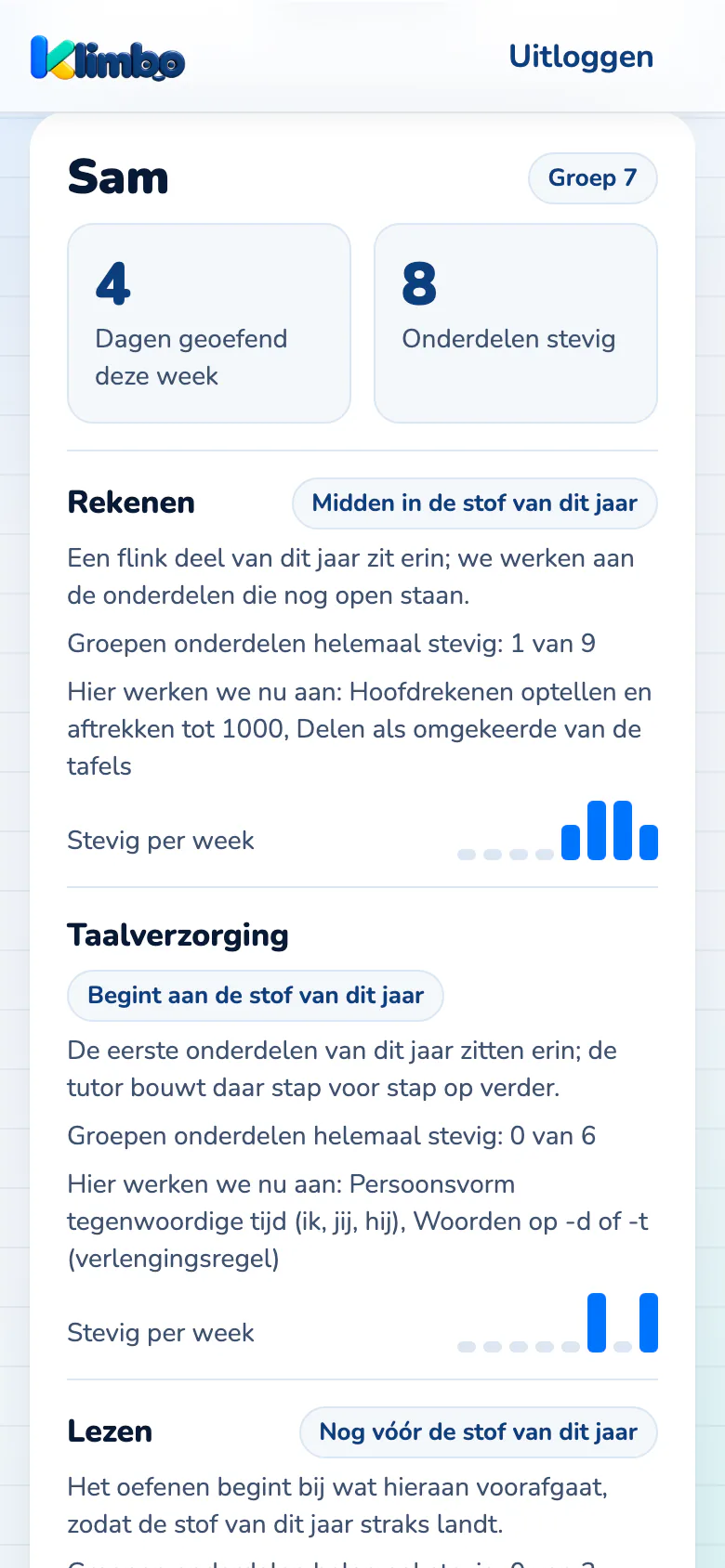
Where your child stands, per topic
Read moreLess
For maths, spelling and reading separately you see where practice starts. It is a starting point and says nothing about the advice for secondary school (the schooladvies).A heads-up in time
Read moreLess
If your child keeps making the same thinking mistake, or something starts to slip, you get a heads-up with what you can do about it.Something to talk about every week
Read moreLess
Every Sunday your child gets one thing to tell at home about what they learned that week. With the weekly email you know what to ask.

Trust
Who is behind Klimbo, and how we treat your child
Who we are
Built in the Netherlands, together with parents
Klimbo is built by Dario, Luuk and Martijn, the makers of UPYourself, together with the families who join now.
Read moreLess
The questions follow the core goals of Dutch primary school (the kerndoelen). The learning principles behind them, spaced repetition and retrieval practice, are well researched.
Questions? Email Luuk at luuk@upyourself.nl.
Privacy
Three rules we keep to
From your child we only ask for a first name and the groep.
Your child's account and progress are stored in a European database. Klimbo has no adverts and no trackers.
You give consent for your child, and with one button you delete everything of your family.
Everything is in the privacy statement, on one page.
Price
Free until the official start
After that you decide yourself whether to carry on.
Until January 2027
You pay nothing
- The whole app, for every child in your family
- Fifteen minutes a day, with an explanation after a mistake
- You do not need to enter any payment details
After that
A fraction of what tutoring costs
- You pay per child, and every child after the first costs less
- You cancel yourself, in the app, per month
- Tutoring often costs more per hour than Klimbo per month
Questions
Frequently asked questions
What does the AI do, and what does it not do?
The AI writes the explanation, the hints and the encouragement for a question, fitting the mistake your child makes. After a mistake your child has three buttons, in this order: "Hint" (a short pointer), "Leg het anders uit" (explain it differently: the same explanation in other words) and "Ik snap het nog niet" (I still don't get it: the first step shown). Then your child may try again. If it goes wrong again, the tutor shows how it is done under the heading "Zo kan het" (this is how), with the answer at the bottom. Your child cannot type anything to the AI. They choose from those buttons. A fixed learning engine decides whether an answer is right, which level fits and what the next step is, not the AI. Everything your child gets to see goes through a filter. If your child taps "Ik snap het nog niet", Klimbo asks an AI model from Anthropic to show the first step. That model only gets the question, the right answer and the kind of mistake. What your child typed does not go with it, and neither does anything that could identify your child. Anthropic is based in the United States and does not train its models on that data.
What will it cost, and when can I start?
You can start today. Until the official start in January 2027 you pay nothing; in return we ask you now and then what could be better. We announce the price well before the start. You then pay per child, and every child after the first costs less. No money is taken until you take out a subscription; you cancel yourself in the app, per month and without a notice period. You can delete your data there too. Founding families keep their own agreement.
What do you ask of us while it is free?
That your child practises for fifteen minutes on most days, and that now and then you answer a few short questions about how it is going. If something does not work, we would like to hear it.
Join
Start today. Until the official start it is free.
Creating an account takes two minutes. Your child starts with the starting check, and you then see on your phone how it is going.
Create a free accountWould you rather wait and hear from us?